

In This Article
Every November, the same small drama plays out in spare bedrooms and converted garages across the country. You sit down at your desk, the chair greets you like a slab of refrigerated vinyl, and your productivity drops about as fast as the thermostat. A heated office chair seat cushion for cold home offices is the cheapest way to fix that, because it warms you instead of the whole room.

A heated office chair seat cushion is a thin, electrically warmed pad that sits on or straps to a desk chair. It uses a low-voltage heating element, a controller, and usually an auto shut-off timer to keep your back, hips, and thighs warm during long sitting sessions. Some run on USB, some on a wall adapter, and a few on a rechargeable battery.
Here’s the catch. The market is a swamp of near-identical listings with names like “Winter Warm Heated Seat Cushion for Office Chair with Lumbar Support,” and the differences that matter (power source, strap fit, coverage, safety features) are buried. I built this guide to dig them out.
The honest part: I haven’t personally tested these cushions. Everything below comes from spec sheets, manufacturer safety documentation, and aggregated review sentiment from published roundups and retailer pages, and I flag clearly where reliable review data is thin. Safety guidance matters here, so I’ve also leaned on FDA and CPSC heating pad guidance, which is older but still sensible. We’ll cover seven real products, USB vs wall plug power, whether a cushion affects posture, and how to keep it from sliding around.
Quick Comparison: Which Power Type Suits Your Desk?
Before the product deep-dive, here’s the decision in one glance. Power source shapes everything else: how hot the pad gets, how many cords you wrestle, and whether you can move the cushion between rooms.
| Power Type | Typical Heat Strength | Cord Situation | Best For |
|---|---|---|---|
| USB 5V pad | Gentle to moderate | Thin cable to a charger, laptop, or power bank | Melissa Portable USB Heated Seat Cushion, JS LifeStyle Portable Heated Seat Cushion |
| USB or plug-in (dual power) | Moderate, with a larger heated area | Flexible, with USB or an adapter | WOOLALA USB Heated Seat Cushion |
| Wall adapter, full back and seat | Strongest, with the most coverage | Fixed cord to an outlet | Comfier Vibration Back Massager with Heat, FAYKONCEN Heated Seat Cushion |
| Rechargeable battery | Moderate, with limited runtime | None while in use | SAVIOR HEAT Heated Seat Pad |
Review roundups generally say that USB-powered pads trade some heat output for convenience, while mains-powered models run hotter. That matches the physics, since a basic USB port delivers far less power than a wall adapter. So if your office is truly frigid, plug-in or dual-power models deserve a hard look. If you just need a warm seat for a heated-but-drafty room, USB is plenty. Matching the power type to your actual cold level saves you from either shivering or overpaying.
💬 Just one click — help others make better buying decisions too!😊
Top 7 Heated Office Chair Seat Cushions for Cold Home Offices: Expert Analysis
Prices below are approximate ranges at the time of research and may vary, so check current pricing before you buy. Where I couldn’t verify independent buyer reviews for a product, I say so rather than guessing.
1. Melissa Portable USB Heated Seat Cushion — fastest, simplest warmth for small budgets
The Melissa Portable USB Heated Seat Cushion is the “plug it in and stop complaining” option. It’s a foldable 17×17 inch pad with three heat settings. Reviewers highlight that it ships with a power adapter, a 6.6-foot Type-C cable, and a carry bag, which is unusually generous in this price tier.
On paper, a 17-inch square covers the seat and little else. That means warm thighs and hips but a cold back. Foldable construction also means thin padding: this warms a chair rather than cushions it. The sensible buyer here is someone with a decent chair who just wants the sting taken out of the cold.
Review roundups describe it as quick to warm up and easy to set up, with the common caveat that USB-class heat is milder than mains-powered pads. A couple of reviewers frame it as a beginner pick because the controls are simple.
Pros:
- ✅ Warms up quickly, per review roundups
- ✅ Includes adapter and long Type-C cable
- ✅ Folds flat for storage or travel
Cons:
- ❌ Seat-only coverage leaves the back cold
- ❌ Thin padding adds no real comfort
Price check: comparable USB pads typically fall in the $25-$45 range, and for that money it’s a smart entry point.

2. JS LifeStyle Portable Heated Seat Cushion — featherweight pad for tight desks
At roughly 5.3 ounces, the JS LifeStyle Portable Heated Seat Cushion is closer to a placemat than a cushion. It’s a USB-powered, 19-inch pad with three heat settings that top out around 122°F, according to its listing.
That 122°F ceiling is a genuinely useful detail. It’s warm enough to take the chill off, but cool enough that it won’t feel like a hot stone, which also makes it a calmer choice for people who find intense heat uncomfortable. The trade-off is that on a drafty winter morning you may want more punch than it can deliver.
Because it’s so light and thin, it slips easily into the space-saving category: easy to stash in a drawer, easy to carry between a desk and a couch. If you share a workspace or rotate between rooms, that portability is the main selling point.
I couldn’t verify a meaningful set of independent buyer reviews for this specific model, so treat the manufacturer specs as the main evidence and give the cushion a careful first week of use.
Pros:
- ✅ Ultra-light at about 5.3 ounces
- ✅ Three heat settings, capped near 122°F
- ✅ USB power works with chargers or power banks
Cons:
- ❌ Minimal padding and no back heating
- ❌ Gentle heat may disappoint in very cold rooms
Price check: expect it in the budget-friendly range, roughly $20-$40. It’s good value if portability is your priority.
3. WOOLALA USB Heated Seat Cushion — big heating area with flexible power
The WOOLALA USB Heated Seat Cushion is where the category starts to feel like a real winter solution. Listings describe a large heating area, around 17 by 35.5 inches, with a graphene element, and it can run from USB or a plug-in adapter.
That long format matters. A pad that extends up the backrest warms your lower and mid back, which is where many people feel the cold first when they’ve been sitting still. The dual-power design also solves a practical problem: you can use a wall adapter for stronger heat at your desk, or a power bank when the cord would be awkward.
Review roundups describe it as portable and compatible with power banks or laptops. As always, treat “USB compatible” as a hint about plugging convenience, not a guarantee of maximum heat.
I found limited verifiable user-review detail for this model, so I’ll be careful: the case for it rests on the spec sheet, not a pile of owner testimony.
Pros:
- ✅ Large heating area covers seat and back
- ✅ Works on USB or plug-in power
- ✅ Graphene element listed for even heat
Cons:
- ❌ Longer pad needs careful strapping to stay put
- ❌ Limited verified review data for deeper judgment
Price check: pads of this size usually land around $35-$60. Good value if you want back coverage without going to a massager.
4. KINGLETING 7-Level Heated Cushion — reliable budget pick with a grippy base
The KINGLETING 7-Level Heated Cushion earns its spot for a feature most listings gloss over: how it stays on the chair. Reviewers highlight a non-slip base and a secure fastening system, plus automated timer functions.
Seven heat levels is more than a gimmick. The gap between “barely warm” and “too hot” is narrow, and finer steps let you land on a comfortable setting instead of bouncing between settings. The auto shut-off is also the right kind of safety net for people who forget a heated pad is on.
Roundup reviewers call it a dependable budget choice and praise the no-fuss automation. One caution applies to this whole segment: an independent review-analysis tool flagged complaints about power-adapter failures on a comparable 7-level office cushion, so it’s worth checking the warranty and keeping your purchase record.
Pros:
- ✅ Seven heat levels allow fine adjustment
- ✅ Non-slip base and fastening system
- ✅ Auto timer for safer unattended use
Cons:
- ❌ Adapter durability is a category-wide worry
- ❌ Less luxurious padding than massager models
Price check: typically in the budget-to-mid band, roughly $30-$50. Reasonable value for the controls you get.
5. Comfier Vibration Back Massager with Heat — heat plus massage for full back and seat
The Comfier Vibration Back Massager with Heat blends two jobs: a heated seat and a vibration massager. The 10-motor model lists graphene heating pads covering the back and seat, with heat zones that can run separately, plus overheat protection, auto shut-off, and straps meant to hold it to a chair.
The key point is that this is a vibration massager, not a shiatsu kneading unit, and retailers say so explicitly. If you expect rolling nodes, you’ll be disappointed. If you want gentle buzzing plus heat for a stiff back, it fits. The manufacturer’s listing says it warms in as little as three minutes and peaks around ten.
Buyer sentiment is mixed in a normal way. Some reviewers say it eases long hours at the desk. Others report a strong chemical odor straight out of the bag, and one older complaint says it didn’t reach the heat expected. Air it out before first use.
Pros:
- ✅ Back and seat heat zones work separately
- ✅ Ten vibration motors add massage
- ✅ Listings cite overheat protection and auto shut-off
Cons:
- ❌ Bulkier, corded design is harder to store
- ❌ Some buyers report initial odor
Price check: the 10-motor model commonly sits in the $40-$75 range. Strong value for a two-in-one, if you’ll actually use the massage.

6. FAYKONCEN Heated Seat Cushion — set-and-forget warmth with dual zones
The FAYKONCEN Heated Seat Cushion is the quiet pick. It doesn’t headline with massage or battery tricks. Reviews describe dual-zone warming and a balance of performance and safety for daily office use.
Dual-zone heating is worth understanding. Instead of one uniform sheet, separate zones let the pad warm different areas, which can feel more natural than a single blast of heat under your thighs. For someone sitting eight hours, even warmth beats a hot spot.
One review roundup names it the best bet for a reliable, set-and-forget warmer for a daily office chair. That’s a useful judgment, though I’d caution that it’s a single source and not a large body of verified owner reviews.
Pros:
- ✅ Dual-zone warming for more even heat
- ✅ Reviewers praise balanced performance and safety
- ✅ Suits daily, long-session use
Cons:
- ❌ Fewer verifiable independent reviews than big brands
- ❌ Not portable if tied to a wall adapter
Price check: likely in the mid-$30s to $60 range, though prices move, so check current listings. It’s a solid pick for someone who wants fewer decisions.
7. SAVIOR HEAT Heated Seat Pad — cordless warmth on a 10,000mAh battery
The SAVIOR HEAT Heated Seat Pad solves a problem no wall plug can: you’re moving. It runs from a 10,000mAh battery pack and uses a carbon nanofiber heating element.
The practical impact is freedom. No cable snaking across your floor, no tripped outlets, and the ability to carry it from desk to couch to a cold garage workshop. A roundup labels it “long lasting,” which I read as a durability impression, not a verified runtime number.
The real-world caution is runtime. Heated pads draw real power, and battery life depends on heat level, so don’t assume you’ll get a full workday on one charge. Test it against your sitting schedule and keep the charging cable handy.
Pros:
- ✅ Cordless operation removes cable clutter
- ✅ Carbon nanofiber element for thin, flexible heating
- ✅ Handy for hot-desking and workshops
Cons:
- ❌ Battery runtime limits all-day use
- ❌ Battery adds weight and recharging chores
Price check: battery-equipped pads generally run higher, often $50-$90. Worth it if cordless freedom matters.
Top 7 at a Glance
| Product | Power | Coverage | Price Range | Best For |
|---|---|---|---|---|
| Melissa Portable USB Heated Seat Cushion | USB (adapter included) | Seat | $25-$45 | Budget beginners |
| JS LifeStyle Portable Heated Seat Cushion | USB | Seat | $20-$40 | Space-saving desks |
| WOOLALA USB Heated Seat Cushion | USB or plug-in | Seat and back | $35-$60 | Back warmth on a budget |
| KINGLETING 7-Level Heated Cushion | Check listing | Seat | $30-$50 | Fine heat control |
| Comfier Vibration Back Massager with Heat | Wall adapter | Back and seat | $40-$75 | Heat plus massage |
| FAYKONCEN Heated Seat Cushion | Check listing | Seat | $35-$60 | Daily set-and-forget use |
| SAVIOR HEAT Heated Seat Pad | Battery | Seat | $50-$90 | Cordless flexibility |
Looking at the table, the WOOLALA USB Heated Seat Cushion and the Comfier Vibration Back Massager with Heat are the only options that clearly warm your back as well as your seat, which is why they suit the coldest rooms. The JS LifeStyle Portable Heated Seat Cushion and Melissa Portable USB Heated Seat Cushion win on portability and price but leave your lower back exposed. Choose by coverage first, then power.
Transformation Guide: Setting Up Your Cushion in the First 30 Days
A cushion’s value lives in the setup. These steps cover what listings rarely mention.
Day one: air it out and inspect. Unbox it, check the cord and controller for damage, and let it breathe for a few hours if it smells of new plastic. Read the manual’s safety page, because several manufacturers explicitly say not to use the cushion while sleeping and to keep clothing between your skin and the pad.
Week one: find your heat level. Start low. Heat that feels pleasant for ten minutes can feel hot after an hour, and one manufacturer manual warns that long, uninterrupted contact can cause burns even when the heat isn’t immediately felt. Use the lowest setting that keeps you comfortable.
Position it on top, not underneath. FDA and CPSC heating pad guidance says to place a heating pad on top of the body rather than under it, because trapped heat raises the temperature. For a seat cushion, that translates to avoiding stacking blankets or extra cushions over it.
Mind the cable. Route it so your chair casters don’t roll over it. Don’t pull the plug out by the cord, and don’t fold or crush the pad for storage unless the manual says it’s fine.
Maintenance rhythm: inspect the cord monthly, spot-clean per the manual, and never wash the heating element. One manual states the heat pad cannot be washed. Unplug it whenever you leave the desk.
Thirty days in, you’ll know whether the heat level, strap fit, and power setup fit your routine. If you notice a hot spot, flickering heat, or a damaged cord, stop using it.
Real-World Scenarios: Matching the Cushion to the Person
These scenarios are illustrative profiles, not testimonials. They show how the spec comparisons play out.
The remote worker in a drafty basement. She works eight hours a day in a below-grade room with concrete walls. Her problem is back and hip cold, not just seat cold. The WOOLALA USB Heated Seat Cushion or the Comfier Vibration Back Massager with Heat fits best because both cover the back, and a wall adapter keeps heat steady all day.
The student in a shared apartment. He studies at a desk, a kitchen table, and sometimes the library. Budget is tight and the chair changes. The Melissa Portable USB Heated Seat Cushion fits: cheap, foldable, and powered by a charger or power bank he already owns.
The hot-desking freelancer. She rotates between a home office, a coworking space, and a cold garage studio. The SAVIOR HEAT Heated Seat Pad earns its higher price here, since cordless operation matters more than all-day runtime.
The long-session gamer or writer. He sits four to six hours and wants fine control. The KINGLETING 7-Level Heated Cushion offers the stepped heat and timer that suit marathon sessions without overheating.
Notice the pattern: coverage and power source decide the match far more often than brand names do.
Strap Fit on Office Chairs: Keeping a Cushion From Sliding
A heated cushion that wanders across your seat is both annoying and a safety issue, because a shifting pad can pull on its cord. Strap fit on office chairs is the most underrated factor in this category. One review on a related heated pad complained that it lacked an adjustable strap and slipped around the seat.
Here’s a practical problem-to-solution guide:
- Problem: the cushion slides forward. Solution: choose a model with a non-slip base, like the KINGLETING 7-Level Heated Cushion, and tighten any straps behind the backrest.
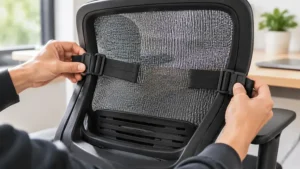
- Problem: straps don’t reach around a bulky chair. Solution: measure your seat and back width before buying and compare it to the listed dimensions. Mesh-back chairs and chairs with wide wings may need extra-long straps.
- Problem: the pad bunches at the backrest. Solution: seat the pad fully into the chair’s lower corner before tightening, and avoid over-tightening, which can crimp the heating element.
- Problem: the cord pulls the pad loose. Solution: route the cord behind the chair and give it slack, so rolling doesn’t tug it.
The Comfier Vibration Back Massager with Heat lists straps designed to hold it to a chair, which is a relief for a bulky unit. For thin portable pads like the JS LifeStyle Portable Heated Seat Cushion, a strapless design means friction is doing the work, so a smooth leather or vinyl seat may be trouble. Test for a week and adjust.
What Is a Heated Office Chair Seat Cushion for Cold Home Offices?
A heated office chair seat cushion for cold home offices is a pad that warms your back and seat while you work, using a low-voltage heating element powered by USB, a wall adapter, or a battery. Most include temperature settings and an auto shut-off timer. It keeps you comfortable without heating the whole room.
Inside, you’ll typically find carbon fiber, graphene, or similar flexible heating elements embedded in fabric or foam. A controller regulates the temperature, and safety features like overheat protection and timers limit how long the pad stays on. Consumer review sites note that modern pads are designed with these features, though they also advise against leaving any electrical device unattended for extremely long periods.
Why choose this over a space heater? Efficiency, mostly. Heating a person is cheaper than heating a room, and a pad warms exactly the spots that go cold first. It’s also quiet, small, and easy to store when spring arrives.
How to Choose a Heated Office Chair Seat Cushion for Cold Home Offices
Choosing well takes about five minutes if you know what to weigh. Work through these steps in order.
- Decide on coverage. Seat-only pads suit mild chill; seat-and-back pads suit truly cold rooms. If your lower back goes numb first, skip seat-only models.
- Pick your power source. Wall adapters give stronger heat, USB gives convenience, batteries give freedom. See the next sections for the trade-offs.
- Check size against your chair. Compare listed dimensions to your seat depth and backrest height, since “universal fit” is marketing, not measurement.
- Look for safety features. Auto shut-off, overheat protection, and clear safety certifications on the listing are worth paying for.
- Value heat control. Three settings suffice for most people; seven levels help if you’re sensitive to heat.
- Consider thickness. A thicker pad raises your seat height, which can affect how your feet and desk line up.
- Check the warranty. Adapter and controller failures are the usual weak point, so a returns window matters.
USB vs Wall Plug Power: Which Is Better at a Desk?
USB vs wall plug power is the decision that shapes your whole experience, so let’s be concrete.
USB (5V). Great for flexibility: it runs from a laptop port, a charger, or a power bank. The catch is wattage. A basic laptop USB port can deliver only a few watts, while a wall charger can provide notably more. Review guides generally find USB-powered cushions milder in heat than mains models, so match your cushion to a proper charger rated for its input.
Wall plug. Stronger, steadier heat and no battery to babysit. The downside is a fixed cord and a nearby outlet. One buyer review on a wall-plug pad complained that the plug cable failed within eight months, a reminder to check warranty terms.
Battery. No cord, but limited runtime and added weight.
My rule of thumb: if your office is below comfortable and you sit for hours, favor wall power. If you’re only slightly chilly or you move around, USB wins on convenience. In both cases, a decent power source matters more than the pad itself.
USB Heated Seat Pad for Desk Chair: What to Expect From Low-Power Warmth
A USB heated seat pad for desk chair use is the lightest-touch way to get warm. These pads are thin, flexible, and typically designed for modest temperatures, like the roughly 122°F ceiling listed for the JS LifeStyle Portable Heated Seat Cushion.
What does that mean in practice? You won’t feel a roaring hot seat. You’ll feel the chill leave the chair within a few minutes, and a gentle warmth stay with you. For many home offices, that’s exactly right.
To get the most from a USB heated seat pad for desk chair setups, use a wall charger or power bank rated to supply enough current, and avoid weak laptop ports. The Melissa Portable USB Heated Seat Cushion helps here by including an adapter, so you don’t have to guess. A USB heated seat pad for desk chair use also pairs well with a power bank if you want a cordless trial before committing to a bigger purchase.
Heated Back and Seat Cushion for Work: Full Coverage vs Seat-Only
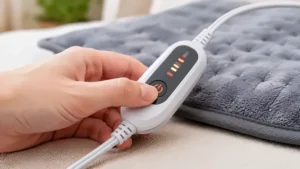
If you’ve felt a cold ache across your lower back after an hour at your desk, a heated back and seat cushion for work may be what you need. Coverage matters because the back is often the coldest, most neglected surface in a winter office.
The WOOLALA USB Heated Seat Cushion and the Comfier Vibration Back Massager with Heat both extend heat up the backrest. The Comfier even lets back and seat heat zones run independently, which means you can keep your back warm without roasting your thighs.
The trade-off is bulk and fit. A long pad needs to match your chair’s backrest height, and a heated back and seat cushion for work can feel less portable than a folding seat pad. If you only need a warm seat, a seat-only pad saves money and setup time. If your complaint is a cold, stiff back, pay for the longer pad.
Space-Saving Desk Chair Warmer: Small Offices and Tight Setups
If your “office” is a corner of a bedroom, you want a space-saving desk chair warmer that disappears when you’re done. That’s where thin, foldable pads shine.
The JS LifeStyle Portable Heated Seat Cushion weighs around 5.3 ounces, and the Melissa Portable USB Heated Seat Cushion folds flat and comes with a carry bag. Either slips into a drawer or bag, a real advantage in a shared room.
A space-saving desk chair warmer also means fewer cables. Pair it with a short USB cable and a power bank, and the setup stays clean. The compromise is padding and coverage: you won’t get back heat or plush comfort. For small spaces, that’s usually a fair trade.
Features That Actually Matter (And Those That Don’t)
Marketing loves feature piles. Here’s the filtering.
Matters: auto shut-off, overheat protection, adequate coverage, a secure fit, and a reliable adapter. These decide whether the cushion is safe and usable.
Sometimes matters: stepped heat levels, back-and-seat zone control, and a carry bag. They improve comfort but won’t rescue a poor design.
Rarely matters: gift packaging, “fast heating in seconds” claims, and extra massage modes if you won’t use them. Fast warm-up claims vary by listing, and the difference between thirty seconds and three minutes won’t change your day.
Notice that the Comfier Vibration Back Massager with Heat is the one product where an extra feature (vibration) is the point. Everywhere else, simplicity wins.
Does It Affect Posture?
Does it affect posture? Short answer: it can, but mostly through thickness and habits, not heat.
Ergonomic guidance emphasizes a neutral posture where joints are naturally aligned, and OSHA’s computer workstation guidance stresses a supportive backrest and adjustable seat. A thin heated pad shouldn’t disrupt that. Listed dimensions for some portable pads are only around 0.4 inches thick. A thick, plush pad, however, can raise your seat height, so your feet may leave the floor and your arms may sit lower relative to the keyboard.
Posture research on cushions generally studies purpose-built ergonomic designs, not heated pads. One study on a seat cushion for office workers found that a cushion designed to improve lumbo-pelvic posture could reduce lower back pain and extend sitting time. That’s a different product, but the lesson transfers: shape and support matter more than warmth.
Practical tips: keep your feet flat, your knees near hip height, and stand up regularly. Warmth can make sitting more pleasant, which is nice, but it can also tempt you to sit longer. Manufacturer manuals advise avoiding long, uninterrupted sitting on a heated surface. Take breaks.
Safety, Regulations, and Compliance: Read This Before You Plug In
Heated pads are generally safe when built and used properly, but not every product earns that benefit of the doubt. Federal data shows why this is worth a paragraph.
FDA and CPSC guidance warns that heating pad fires can occur when insulation breaks down or cords are cracked or frayed, and it identifies people with reduced sensation (such as advanced age, diabetes, or spinal cord injury) as higher risk for burns. Always unplug the pad when not in use.
Recalls exist in this exact category. A 2018 voluntary recall by Lifeworks Technology covered some 12V heated seat cushions, USB-powered heated seat cushions, and heated blankets over fire or burn concerns, documented in a NHTSA recall report. More recently, the CPSC has recalled heating blankets and pads for malfunctioning controllers, as with a 2023 Bedsure recall.
Safety checklist:
- Look for listed safety certifications and overheat protection.
- Don’t use it while sleeping, and keep clothing between skin and pad.
- Never fold, puncture, or wash the heating element.
- Inspect cords regularly, and stop using any pad that smells of burning, flickers, or overheats.
- Check recall databases for your specific model.
Long-Term Cost and Maintenance: What a Cushion Really Costs
The sticker price is only part of the cost. A budget cushion in the $25-$45 range that fails in a season costs more per winter than a $60 model that lasts years.
Think in cost per use. If a $50 pad survives three winters at roughly 100 working days each, that’s about 17 cents per day. Electricity is minimal, since the pad warms you instead of the room.
Where long-term costs creep in: adapters and controllers, which reviewers cite most often as failure points, so keep receipts and warranty details. Battery pads add replacement or recharge hassle. Massager models add motors that can wear.
Maintenance is cheap. Inspect cords, spot-clean per instructions, store flat or loosely rolled, and never wash the heating element. A pad that’s cared for outlasts one that’s stuffed in a drawer.
Heated Cushion vs Other Ways to Warm a Cold Office
| Option | What It Warms | Typical Drawback | Best For |
|---|---|---|---|
| Heated seat cushion | You, directly | Needs power and safe use | Cold chairs and desks |
| Space heater | The room | Higher energy use, safety risks | Whole-room warmth |
| Heated throw or blanket | Legs and torso | Cord management | Reading, light work |
| Extra layers | Whatever you wear | Bulky for typing | Mild chill |
A heated cushion beats a space heater for efficiency because it targets the person, not the air. It loses to a blanket for legs and lap warmth, so some people pair the two. If your whole room is frigid, a cushion alone won’t fix it, but it makes the desk bearable.
✨ Don’t Miss These Exclusive Deals!
🔍 Take your cold home office to the next level with these carefully selected cushions. Click on any highlighted item to check current pricing and availability. A little warmth under you goes a long way toward making winter workdays feel cozy!
FAQ
❓ What is the best heated office chair seat cushion for cold home offices?
❓ Can a USB heated cushion run off a laptop port?
❓ Is it safe to leave a heated seat cushion on all day?
❓ Will a heated cushion fit a mesh-back chair?
❓ How much should I spend on a heated desk chair pad?
Conclusion
A heated office chair seat cushion for cold home offices is one of the cheapest comfort upgrades you can make, but only if you pick for your real situation. If you need back coverage in a truly cold room, the WOOLALA USB Heated Seat Cushion and the Comfier Vibration Back Massager with Heat are the strongest matches. If you’re watching your budget and just want a warmer seat, the Melissa Portable USB Heated Seat Cushion is a sensible start. For tiny spaces, the JS LifeStyle Portable Heated Seat Cushion earns the space-saving crown, while the KINGLETING 7-Level Heated Cushion wins on heat control and grip. The FAYKONCEN Heated Seat Cushion suits set-and-forget routines, and the SAVIOR HEAT Heated Seat Pad is the cordless option for people on the move.
My honest caveat: review data for several of these models is thin, so lean on specs, warranties, and safety features, and test your cushion carefully in the first week. Then take your breaks, keep your feet flat, and let the warmth do its job.
✨ Ready to stop shivering at your desk?
🔥 Pick the cushion that matches your chair and power setup, click to check current pricing and availability, and get your winter workdays back!
Recommended for You
- Heated Recliner Chair For Small Living Rooms: 7 Best Picks 2026
- Heated Recliner With Lift Assist For Seniors: 7 Proven Picks (2026)
- Heated Massage Recliner For Back Pain: 7 Best Honest Picks (2026)
Disclaimer: This article contains affiliate links. As an Amazon Associate, I earn from qualifying purchases. If you purchase products through these links, we may earn a small commission at no additional cost to you.
✨ Found this helpful? Share it with your friends! 💬🤗
